letbloom Loading

AI guest support for short-term rental hosts and managers

Spend less time on the same guest questions.

letbloom uses your property guide to answer everyday questions on WhatsApp and web chat. Guests get useful details for their stay. You get more time for hosting.

30 days free for eligible new customers. Cancel anytime.

Orchard House · Guest chat

Guest

We arrive at noon. Can we leave our bags before check-in?

letbloom

Yes, please leave them in the luggage cupboard by the entrance from noon. Check-in is at 3 pm.

Guest

Great. We’re bringing two cars. Is there parking?

letbloom

There’s one space at the property. For your second car, Market Street car park is a five-minute walk away.

Illustrative conversations using fictional property information. Actual wording can vary.

A little less back-and-forth

Make room for the work that needs you.

Fewer questions on repeat

Wi-Fi, arrival details, check-out. Give guests useful answers from your guide without writing the same reply each time.

24/7, in your guests’ language

From early arrivals to late-night questions, guests can ask on WhatsApp or web chat and get an answer from your guide.

A clear view of the conversation

Review guest messages, reply yourself and pause AI replies when you need to take over.

Your guide, put to work

Small details. Happy holiday moments.

From finding the pool towels to getting online, your guide helps guests settle in and get on with enjoying their stay.

Property information

Orchard House · Example guide

  • Use the green gate on the left of the building.
  • Wi-Fi network: OrchardGuest. Password: orchard-window-42.
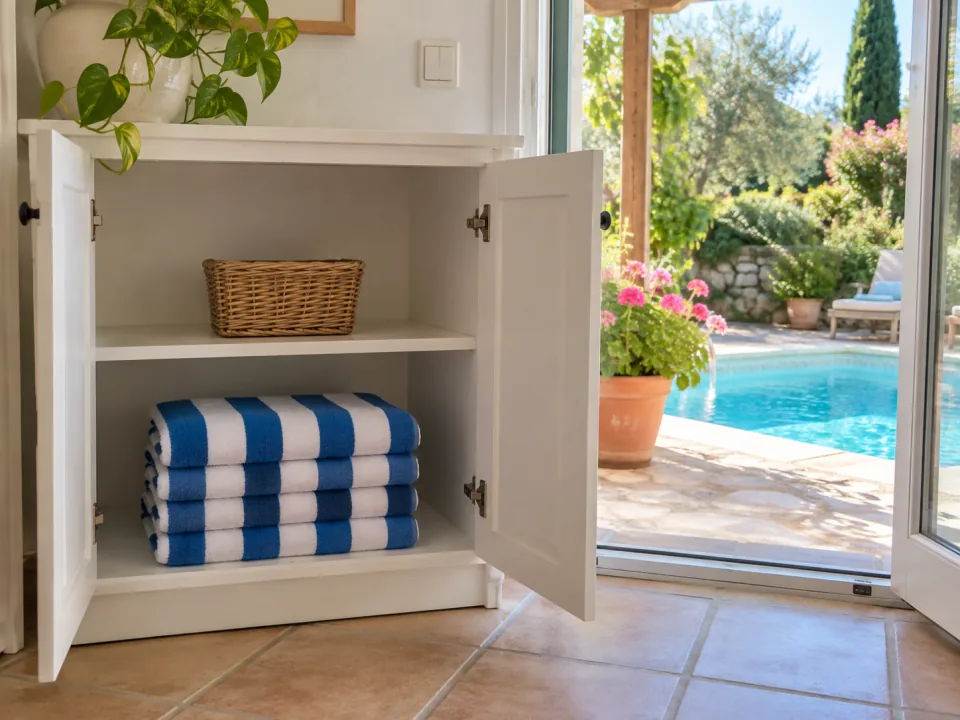
  • Pool towels: blue-and-white striped towels on the lower shelf of the white cupboard beside the patio doors.Blue-and-white striped pool towels on the lower shelf of a white cupboard beside open patio doors, with a sunny pool outside.

From your guide to their answer

Guest

Where can we find towels for the pool?

letbloom

You’ll find the blue-and-white striped pool towels on the lower shelf of the white cupboard beside the patio doors. Enjoy your swim!

Blue-and-white striped pool towels on the lower shelf of a white cupboard beside open patio doors, with a sunny pool outside.
Illustrative conversations using fictional property information. Actual wording can vary.

Your property photos can make the details easier to spot, so guests can get back to enjoying their stay.

Explore more examples

Recurring guest questions can also reveal gaps in your guide. letbloom suggests additions for you to review and save.

Getting started

Get ready, then invite guests in.

Create your account and choose a plan. Prepare each property before sharing guest access.

See the full setup process
  1. Add your property information

    Write or paste your guide, copy one from another property you manage, or import public Airbnb listing text to review. Add the practical details, then save.

  2. Try the questions guests ask

    Try arrival, Wi-Fi and check-out questions. Read the replies and fill any gaps before guests use it.

  3. Share access. Stay involved.

    Share a web-chat link or QR code, or provide WhatsApp access. On WhatsApp, guests send the prefilled property code to begin.

A warm welcome, with the details in place.

Keep guest details, stay dates and concierge access together, from the first welcome to checkout.

  1. Add their stay

    Save guest details and arrival and departure dates.

  2. Send their welcome

    Send now or schedule an email or WhatsApp welcome with their personal concierge access.

  3. Stay in control

    See who needs attention and set when individual access ends.

Explore guest access
Orchard House

Alex Morgan

Stay dates
14–17 September
Welcome status
Email scheduled
Access ends
17 September, 10 am
Illustrative guest card with fictional stay details.

A helpful assistant. You in control.

Stay close when a guest needs you.

Your guide handles the everyday details. For a text request that needs your approval, letbloom offers to contact you and forwards it after the guest confirms.

A clear view of the conversation

Read the conversation, reply to the guest, and pause or resume AI. You keep the decision.

Invite collaborators to help with conversations and guide updates for the properties you share.

An honest answer when a detail is missing

letbloom says the information is unavailable. A missing answer alone does not automatically notify the manager.

How does the manager handoff work?

Urgent or hazardous situations, complaints about cleanliness, damage or the property’s condition, requests still needing approval, and requests to speak to the manager trigger an offer to contact the manager. A later guest confirmation is needed, even when the first message asks for the manager. A refusal or unclear reply does not count as consent.

Eligible alerts include the property, a short issue summary and a conversation link. Email alerts depend on your preferences. Phone alerts require opt-in, a verified number and enabled service configuration; the configured channel may be SMS or WhatsApp. Manager WhatsApp alerts are one-way: open the dashboard to reply.

Supported guest attachments can follow a separate route directly to you, without another confirmation step, where attachments are enabled.

Explore the workflow

When a guest needs your approval

Property informationCheckout is at 10 am. Later departures need manager approval.

Guest

Could we check out at noon?

letbloom

A later checkout needs the manager’s approval. Would you like me to contact them?

Guest

Yes, please.

letbloom

I’ve forwarded your request to the property manager.

For the manager

Late checkout requested for noon

Orchard House · The guest asked to leave at noon and confirmed they want your help. Read the conversation and decide whether to approve.

Illustrative conversations using fictional property information. Actual wording can vary.

Simple plan choices

A plan for the properties you manage.

Starter, Growth and Portfolio share the same core features. Choose by the number of properties you manage and the people helping you.

Choose your plan after creating your account.

For one property

Starter

1 active property

$12.00 / month

30 days free for eligible new customers. Cancel anytime.

A useful place for guests to ask the everyday questions.

Core features included

  • Answers from each property’s guide
  • WhatsApp and web chat
  • Guest links and QR codes
  • Multilingual guest replies
  • Inbox, manager replies and AI controls
Start for free

For a few properties

Growth

Up to 5 active properties

$39.00 / month

30 days free for eligible new customers. Cancel anytime.

Keep each property’s guide and conversations in one account.

Everything in Starter, plus:

  • Up to 5 active properties
  • 1 collaborator About collaborator access

    Collaborator places apply across your account. One person uses one place across properties. The owner is excluded; collaborators do not need a paid plan.

Start for free

For a larger collection

Portfolio

Up to 20 active properties

$169.00 / month

30 days free for eligible new customers. Cancel anytime.

Handle guest questions across your portfolio, property by property.

Everything in Growth, plus:

  • Up to 20 active properties
  • 5 collaborators About collaborator access

    Collaborator places apply across your account. One person uses one place across properties. The owner is excluded; collaborators do not need a paid plan.

Start for free

For a custom arrangement

Enterprise

Custom property allowance

Custom pricing

Tell us about your properties and how you plan to use letbloom.

Everything in Portfolio, plus:

  • Custom property allowance
  • Custom collaborator allowance About collaborator access

    Collaborator places apply across your account. One person uses one place across properties. The owner is excluded; collaborators do not need a paid plan.

  • Agree your plan and commercial terms
Discuss your portfolio

Cancel anytime on Starter, Growth and Portfolio. Access continues until the end of the current trial or billing period. Review final billing details at checkout.

Compare plans and trial terms

Before you start

A few things worth knowing.

What do I need to get started?

Create an account, choose a plan and complete checkout. Add your property details, then try a few questions your guests might ask. You can write or paste your guide, or use a public Airbnb listing description as a starting point and review it. This does not connect an Airbnb inbox or sync bookings.

Do guests need a letbloom account?

No. Guests can talk to your concierge through WhatsApp or web chat.

Can I control the information it uses?

You provide and maintain the property information, and can review conversations and reply yourself. letbloom is designed to use that information and relevant manager instructions, but this is not a guarantee of perfect answers. Test the questions that matter to your property before sharing guest access.

What happens after the free trial?

Eligible new customers receive the trial shown with their plan. Add payment details to continue at the selected monthly price when the trial ends. You can cancel at any time.

Can I use it for more than one property?

Yes. Each property has its own information and guest access. Choose a plan with the active-property allowance you need; active, non-archived properties count toward that allowance.

See the product

Take a closer look at letbloom.

Watch the product walkthrough, then try your own property questions.

From the journal

View all articles

Your next guest question

Give your next guests a guide that can answer back.

Start with the property information you already have. Test the questions guests ask, then share access when you are ready.

30 days free for eligible new customers. Cancel anytime.